
【树莓派脸部追踪】
树莓派脸部追踪
硬件材料
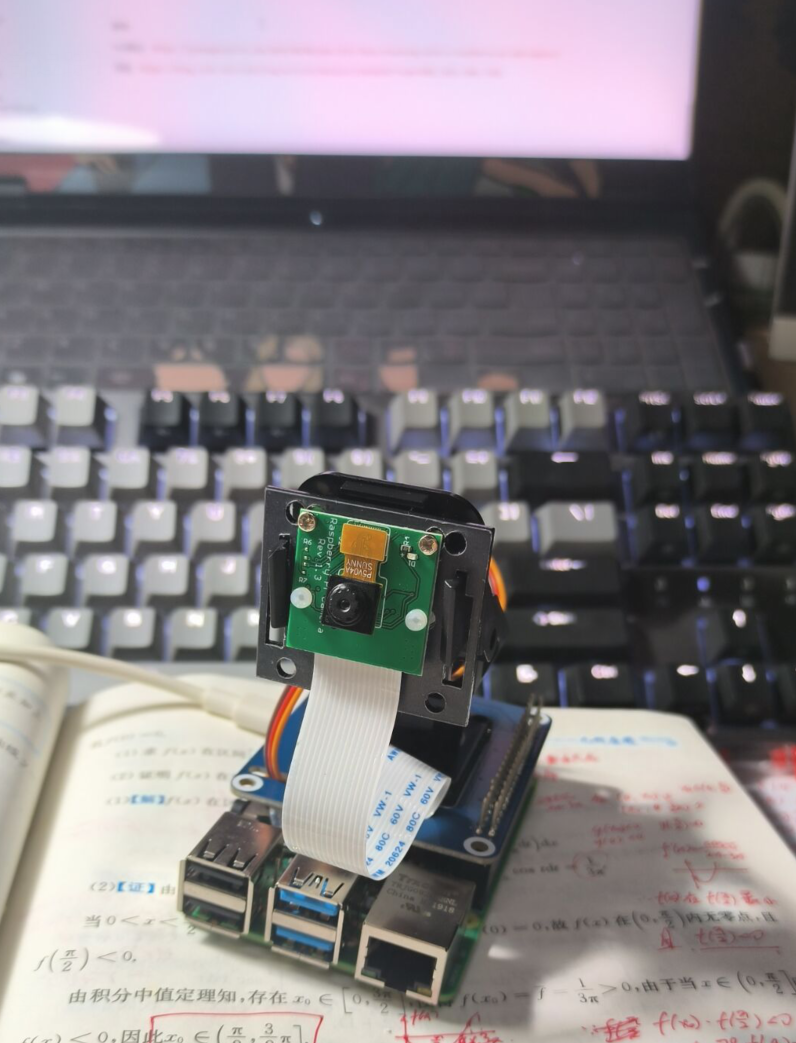
树莓派4B、云台、摄像头
思路
1、电脑上显示摄像头拍摄的视频,并得到人脸坐标,将人脸坐标发给树莓派。
2、树莓派来控制舵机旋转
3、电脑和树莓派之间和socket通信
4、树莓派上使用motion将摄像头内容输出到“192.168.6.179:8081”,从而让电脑获取视频源【192.168.6.179是树莓派地址】
注意:
1、树莓派可能需要关掉防火墙:ufw disable
2、树莓派要先启动motion:sudo motion【只用启动一次即可,一直在后台运行】
人脸跟踪的算法
第一种
获得人脸矩阵中心点坐标【x,y】,再获得视频中心坐标,计算两者误差,从而让摄像头旋转相应角度,旋转时要尽量一度一度的转,不要过激,否则容易让抖动。
当然,我写的只是简单的计算两个中心误差再旋转,缺点是旋转不平滑,改进方式是用PID算法
PID算法参考1:https://pyimagesearch.com/2019/04/01/pan-tilt-face-tracking-with-a-raspberry-pi-and-opencv/
PID算法参考2:https://bcxiaobai.eu.org/post/383.html
第二种
参考:https://blog.csdn.net/rikeilong/article/details/126446567
当人脸矩阵左边或右边快要超出视频边界时再旋转,也是要尽量一度一度的转
代码
电脑上
import socket

class connect_Raspberry():
    def __init__(self,host,port):
        print("客户端开启")
        # 套接字接口
        self.mySocket = socket.socket(socket.AF_INET, socket.SOCK_STREAM)
        # 设置ip和端口

        try:
            self.mySocket.connect((host, port))  #连接到服务器
            print("连接到服务器")
        except:  #连接不成功,运行最初的ip
            print('连接RASP不成功')

    def send(self, words):
        # 发送消息
        msg = words
        # 编码发送
        self.mySocket.send(msg.encode("utf-8"))
        # print("成功发送消息")

    def close(self):
        self.mySocket.close()
        print("与树莓派丽连接中断\n")
exit()import cv2
import mediapipe as mp
import numpy as np
import client
# 检测脸部
mp_face_detection = mp.solutions.face_detection
mp_drawing = mp.solutions.drawing_utils
# 通信传输
myRaspConnection = client.connect_Raspberry('192.168.6.179', 8888)
if __name__ == "__main__":
capture = cv2.VideoCapture("http://192.168.6.179:8081")
ref, frame = capture.read()
fps = 0.0
while (True):
ref, frame = capture.read()
h, w, _ = np.shape(frame)
if not ref:
break
image = cv2.cvtColor(frame, cv2.COLOR_BGR2RGB)
# 脸部检测
with mp_face_detection.FaceDetection(model_selection=0, min_detection_confidence=0.8) as face_detection:
results = face_detection.process(image)
if results.detections:
for detection in results.detections:
box = detection.location_data.relative_bounding_box
# cx,cy,cw,ch=box
cx = box.xmin
cy = box.ymin
cw = box.width
ch = box.height
cv2.rectangle(image, (int(cx * w), int(cy * h)), (int((cx + cw) * w), int((cy + ch) * h)),
(0, 255, 0), 2)
# 控制云台
msg = str(abs(int(cx * w))) + " " + str(abs(int(cy * h))) + " " + str(abs(int((cx + cw) * w))) + " " + str(
abs(int((cy + ch) * h)))
print(msg)
myRaspConnection.send(msg)
frame = cv2.cvtColor(image, cv2.COLOR_RGB2BGR)
# cv2.rectangle(frame, (int(cx*w) , int(cy*h)), (int((cx+cw)*w) , int((cy+ch)*h)),(0, 255, 0), 2)
cv2.imshow("video", frame)
c = cv2.waitKey(1) & 0xff
if c == 27:
capture.release()
break
print("Video Detection Done!")
capture.release()
cv2.destroyAllWindows()
树莓派上
import socket

print("服务开启")
mySocket = socket.socket(socket.AF_INET, socket.SOCK_STREAM)
host = "192.168.6.179"
port = 8888 #自己定义的端口号

mySocket.bind((host, port))
mySocket.listen(10)import time
import sever
import RPi.GPIO as GPIO
from PCA9685 import PCA9685
import math
pwm=PCA9685()
pwm.setPWMFreq(50)
pwm.setRotationAngle(5,0)
if __name__ == '__main__':
pid_X_P=0
pid_Y_P=0
print("等待连接")
client,address = sever.mySocket.accept()
print("新连接")
print("IP is %s" % address[0])
print("port is %d\n" % address[1])
beangle = 90 #每个人的初始角度不同,建议先自己测试好角度
beangle0 = 45
#舵机插的通道口
channel1 = 4 #上下
channel2 = 8 #左右
#变化幅度(这个越大,舵机动的幅度就越大)
angleFreq = 1
#超出屏幕范围(这个调大后,脸部离视频边界检测更灵敏)
changeFreqX = 100
changeFreqY = 20
error_x=500 #当前误差值
last_error_x=100 #上一次误差值
error_y=250
last_error_y=50
wight=900
height=480
piv_x=90
piv_y=45
step=1
try:
print("开始")
while True:
msg = client.recv(1024)
msg = msg.decode("utf-8")
if msg != "":
mess = msg.split(' ')
x0 = int(mess[0])#左上角x
y0 = int(mess[1])#左上角y
x1 = int(mess[2])#右下角x
y1 = int(mess[3])#右下角y
# 方法1:超出中间就偏转
x_mean=int((x0+x1)/2)
y_mean=int((y0+y1)/2)
print("x_mean",x_mean,"y_mean",y_mean)
error_x=int(x_mean-wight/2)
error_y=int(y_mean-height/2)
print("error_x",error_x,"error_y",error_y)
# 误差大于100,要向左偏
if error_x<0 and abs(error_x)>100:
# temp_x=abs(error_x)/(wight/2)*45
step_x=math.exp(abs(error_x)/(wight/2))
print(step_x)
beangle+=step
if beangle >= 180:
beangle = 180
print("向左偏",beangle)
pwm.setRotationAngle(1,beangle)
# 向右偏
if error_x>0 and abs(error_x)>100:
step_x=math.exp(abs(error_x)/(wight/2))
print(step_x)
beangle-=step
if beangle <=10:
beangle = 10
print("向右偏",beangle)
pwm.setRotationAngle(1,beangle)
# 误差大于50,要向上偏
if error_y<0 and abs(error_y)>70:
# if abs(error_y)>=100:
# error_y=100
# temp_x=abs(error_x)/(wight/2)*45
try:
step_y=math.exp(abs(error_y)/(height/2))
except:
step_y=2
print(step_y)
beangle0-=step
if beangle0 <=10:
beangle0 = 10
print("向上偏",beangle0)
pwm.setRotationAngle(0,beangle0)
# 向下偏
if error_y>0 and abs(error_y)>70:
# if abs(error_y)>=100:
# error_y=100
try:
step_y=math.exp(abs(error_y)/(height/2))
except:
step_y=2
print(step_y)
beangle0+=step
if beangle0 >= 85:
beangle0 = 95
print("向下偏",beangle0)
pwm.setRotationAngle(0,beangle0)
# 方法2:快超出屏幕时再旋转
# if x0 < changeFreqX:
# beangle += angleFreq
# if beangle >= 180:
# beangle = 180
# pwm.setRotationAngle(1,beangle)
# #set_servo_angle(channel1,beangle)
# if y0 < changeFreqY:
# beangle0 -= angleFreq
# if beangle0 <= 10:
# beangle0 = 10
# pwm.setRotationAngle(0,beangle0)
# #set_servo_angle(channel2,beangle0)
# if x1 > 640 - changeFreqX: #窗口宽为640
# beangle -= angleFreq
# if beangle <= 10:
# beangle = 10
# pwm.setRotationAngle(1,beangle)
# #set_servo_angle(channel1,beangle)
# if y1 > 480 - changeFreqY: #窗口高为480
# beangle0 += angleFreq
# if beangle0 >= 85:
# beangle0 = 85
# pwm.setRotationAngle(0,beangle0)
# set_servo_angle(channel2,beangle0)
# print("beangle",beangle,"beangle0:",beangle0)
except ValueError as e:
pwm.exit_PCA9685()
print("退出")
print(e)
exit()运行
2、电脑上再运行main.py,电脑上可见一个视频窗口,此时摄像头开始追踪人脸
参考
PID算法:https://pyimagesearch.com/2019/04/01/pan-tilt-face-tracking-with-a-raspberry-pi-and-opencv/
思路:https://blog.csdn.net/rikeilong/article/details/126446567?spm=1001.2014.3001.5502
- 文章作者:
- Lthero博客
- 版权声明:
- 本博客所有文章除特别声明外,均采用CC BY-NC-SA 4.0许可协议。转载请注明来自 Lthero博客!


